Device Bootstrap - JITP
Just-In-Time Provisioning (JITP) allows IoT devices to be automatically registered and provisioned upon their first connection to AWS IoT Core. Devices are pre-loaded with a unique X.509 certificate signed by a Certificate Authority (CA) that has been registered in AWS IoT Core. When a device connects for the first time, AWS IoT Core verifies the device certificate against the registered CA and triggers a provisioning template to create the Thing, activate the certificate, and attach a policy.
This implementation focuses on using a self-managed CA with AWS IoT Core’s JITP capability. Devices that use JITP must have certificates and private keys present on the device before onboarding. The certificates must be signed with the customer’s designated CA, and that CA must be registered in AWS IoT Core. There are many device provisioning and registration options available for different types of manufacturing and distribution circumstances. Check device bootstrap section of IoT Atlas to explore other methods.
If your manufacturing chain cannot provision unique credentials at manufacturing time, consider Fleet Provisioning by Trusted User or Certificate Vending Machine instead.
Use Cases
JITP is a preferred method under the following conditions:
- The manufacturing chain can provision unique credentials (certificate and private key) into each device at manufacturing time.
- You have an existing PKI (self-managed or using a service like AWS Private CA) and want to leverage it for IoT device identity.
- You want zero-touch provisioning where devices register themselves on first connection without requiring a mobile app or installer.
- You need to scale device onboarding without pre-registering each device certificate individually in AWS IoT Core.
- You know which AWS account and region the device will connect to before manufacturing.
Reference Architecture
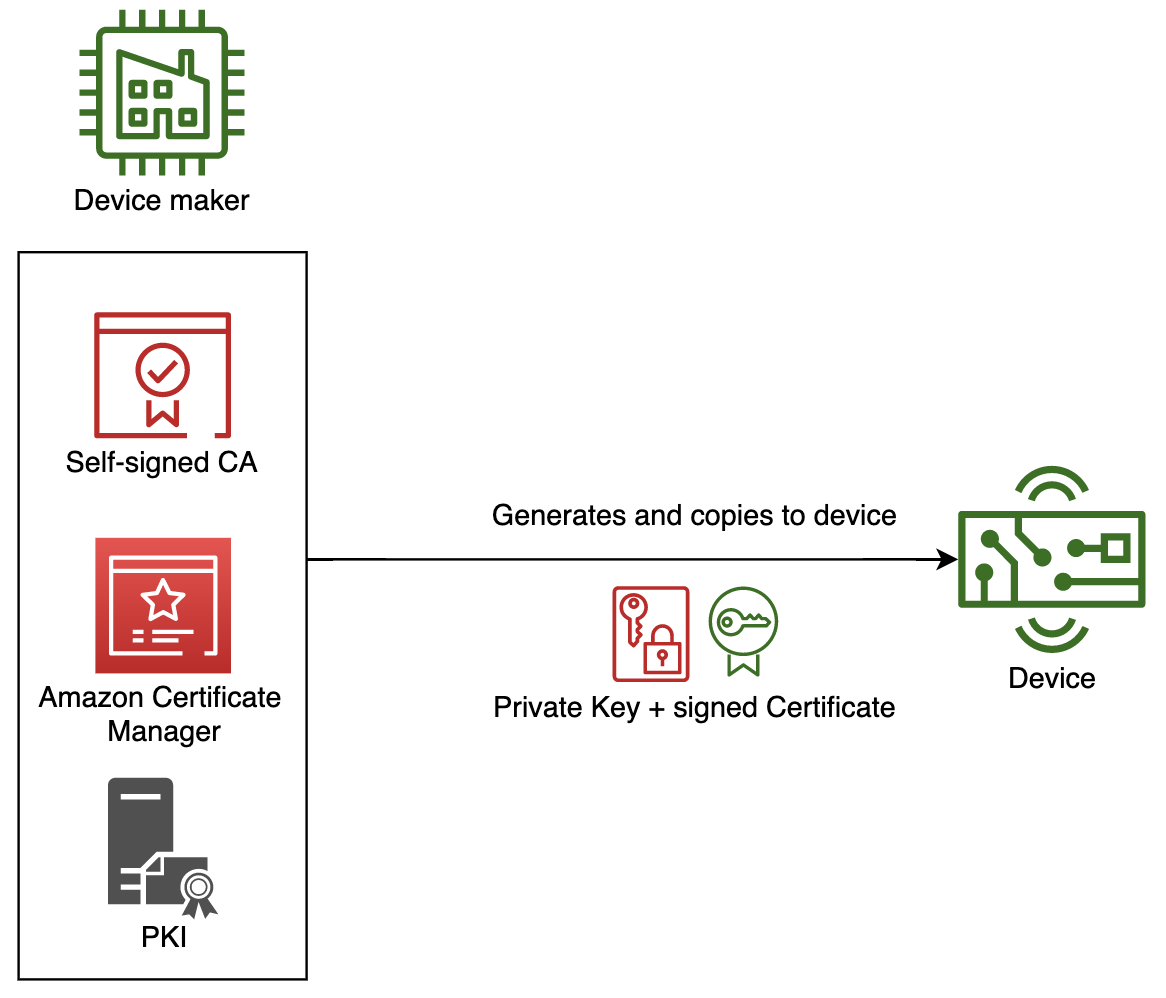
The details of this flow are as follows:
- A private key and signed certificate pair is created using PKI. The PKI can be self-managed or use a managed service like AWS Private CA.
- The private key and signed certificate are securely copied and stored on the device’s persistent storage during manufacturing or distribution.
- A CA certificate is registered in AWS IoT Core with a provisioning template attached. This is a one-time setup per CA.
- The device connects to AWS IoT Core for the first time. During the TLS handshake, both the device certificate and the signing CA certificate are presented.
- AWS IoT Core verifies the device certificate’s signature against the registered CA. The provisioning template is triggered asynchronously.
- The first TLS connection is rejected (the certificate was not yet active when the handshake started).
- The device reconnects after a short delay. The provisioning template has created the Thing, activated the certificate, and attached the policy. The second connection succeeds.
The first connection will always fail and disconnect. Device firmware must implement reconnection logic with exponential backoff (typically 3-5 seconds is sufficient for JITP provisioning to complete).
Implementation
This section provides step-by-step implementation guidance. You need OpenSSL and the AWS CLI installed on your workstation.
1. Create an IAM Role for JITP
Create an IAM role that AWS IoT Core can assume during the provisioning process. Attach the AWSIoTThingsRegistration managed policy.
# Create the trust policy
cat > jitp-trust-policy.json << 'EOF'
{
  "Version": "2012-10-17",
  "Statement": [
    {
      "Effect": "Allow",
      "Principal": {
        "Service": "iot.amazonaws.com"
      },
      "Action": "sts:AssumeRole"
    }
  ]
}
EOF

# Create the role
aws iam create-role \
  --role-name JITPRole \
  --assume-role-policy-document file://jitp-trust-policy.json

# Attach the IoT things registration policy
aws iam attach-role-policy \
  --role-name JITPRole \
  --policy-arn arn:aws:iam::aws:policy/service-role/AWSIoTThingsRegistration
2. Create a Root CA Certificate
Generate a self-signed root CA that will sign all device certificates.
# Generate root CA private key
openssl genrsa -out deviceRootCA.key 2048

# Create OpenSSL config for CA extensions
cat > deviceRootCA_openssl.conf << 'EOF'
[ req ]
distinguished_name = req_distinguished_name
extensions = v3_ca
req_extensions = v3_ca

[ v3_ca ]
basicConstraints = CA:TRUE

[ req_distinguished_name ]
countryName = Country Name (2 letter code)
countryName_default = US
organizationName = Organization Name (eg, company)
organizationName_default = MyOrg
EOF

# Create root CA CSR
openssl req -new -sha256 -key deviceRootCA.key -nodes \
  -out deviceRootCA.csr -config deviceRootCA_openssl.conf

# Self-sign the root CA certificate (valid 10 years)
openssl x509 -req -days 3650 \
  -extfile deviceRootCA_openssl.conf -extensions v3_ca \
  -in deviceRootCA.csr -signkey deviceRootCA.key \
  -out deviceRootCA.pem
3. Register the CA with AWS IoT Core
AWS IoT Core requires proof of CA ownership via a verification certificate.
# Get the registration code for your region
aws iot get-registration-code --region <your-region>
Use the returned registrationCode as the Common Name for a verification certificate:
# Generate verification key
openssl genrsa -out verificationCert.key 2048

# Create verification CSR with registration code as CN
openssl req -new -key verificationCert.key -out verificationCert.csr \
  -subj "/CN=PASTE_REGISTRATION_CODE_HERE"

# Sign verification cert with your root CA
openssl x509 -req -in verificationCert.csr \
  -CA deviceRootCA.pem -CAkey deviceRootCA.key -CAcreateserial \
  -out verificationCert.crt -days 500 -sha256
4. Create the Provisioning Template
The provisioning template defines what AWS resources are created when a device connects via JITP. Save the following as jitp_template.json:
{
  "templateBody": "{\"Parameters\":{\"AWS::IoT::Certificate::CommonName\":{\"Type\":\"String\"},\"AWS::IoT::Certificate::Country\":{\"Type\":\"String\"},\"AWS::IoT::Certificate::Id\":{\"Type\":\"String\"}},\"Resources\":{\"thing\":{\"Type\":\"AWS::IoT::Thing\",\"Properties\":{\"ThingName\":{\"Ref\":\"AWS::IoT::Certificate::CommonName\"},\"AttributePayload\":{\"version\":\"v1\",\"country\":{\"Ref\":\"AWS::IoT::Certificate::Country\"}}}},\"certificate\":{\"Type\":\"AWS::IoT::Certificate\",\"Properties\":{\"CertificateId\":{\"Ref\":\"AWS::IoT::Certificate::Id\"},\"Status\":\"ACTIVE\"}},\"policy\":{\"Type\":\"AWS::IoT::Policy\",\"Properties\":{\"PolicyDocument\":\"{\\\"Version\\\":\\\"2012-10-17\\\",\\\"Statement\\\":[{\\\"Effect\\\":\\\"Allow\\\",\\\"Action\\\":[\\\"iot:Connect\\\"],\\\"Resource\\\":[\\\"arn:aws:iot:REGION:ACCOUNT_ID:client\\/*\\\"]},{\\\"Effect\\\":\\\"Allow\\\",\\\"Action\\\":[\\\"iot:Publish\\\",\\\"iot:Receive\\\"],\\\"Resource\\\":[\\\"arn:aws:iot:REGION:ACCOUNT_ID:topic\\/*\\\"]},{\\\"Effect\\\":\\\"Allow\\\",\\\"Action\\\":[\\\"iot:Subscribe\\\"],\\\"Resource\\\":[\\\"arn:aws:iot:REGION:ACCOUNT_ID:topicfilter\\/*\\\"]}]}\"}}}}",
  "roleArn": "arn:aws:iam::ACCOUNT_ID:role/JITPRole"
}
Replace REGION, ACCOUNT_ID, and the roleArn value with your AWS Region, Account ID, and the ARN of the JITPRole created in Step 1. The template uses AWS::IoT::Certificate::CommonName as the Thing name, so ensure each device certificate has a unique Common Name.


### 5. Register the CA Certificate with Template

```bash
aws iot register-ca-certificate \
  --ca-certificate file://deviceRootCA.pem \
  --verification-cert file://verificationCert.crt \
  --set-as-active \
  --allow-auto-registration \
  --registration-config file://jitp_template.json \
  --region <your-region>
The --allow-auto-registration flag enables JITP. The --registration-config attaches the provisioning template to the CA. The response returns the CA certificate ARN.
6. Create a Device Certificate
For each device, generate a unique certificate signed by the registered CA:
# Generate device private key
openssl genrsa -out deviceCert.key 2048

# Create device CSR
# IMPORTANT: CommonName becomes the Thing name, Country must match the CA certificate
openssl req -new -key deviceCert.key -out deviceCert.csr \
  -subj "/CN=MyJITPDevice001/C=US/O=MyOrg"

# Sign device certificate with root CA
openssl x509 -req -in deviceCert.csr \
  -CA deviceRootCA.pem -CAkey deviceRootCA.key -CAcreateserial \
  -out deviceCert.crt -days 365 -sha256

# Combine device cert and CA cert (required for JITP - CA must be in the chain)
cat deviceCert.crt deviceRootCA.pem > deviceCertAndCACert.crt
7. Device Connection with JITP Retry Logic
Download the Amazon Root CA for server-side TLS verification:
curl -o AmazonRootCA1.pem https://www.amazontrust.com/repository/AmazonRootCA1.pem
The following Python script demonstrates the complete device-side JITP flow, including the connect-fail-reconnect pattern using the AWS IoT Device SDK v2:
- Install SDK:
pip install awsiotsdk - Run:
python3 jitp_device.py --endpoint <YOUR_ENDPOINT> --cert deviceCertAndCACert.crt --key deviceCert.key --root-ca AmazonRootCA1.pem --thing-name MyJITPDevice001
# jitp_device.py - Demonstrates JITP (Just-In-Time Provisioning) device connection with automatic retry logic.
#
# On first connection, AWS IoT Core will reject the TLS handshake while it provisions the device.
# The device must retry after a short delay. On the second attempt, the device connects successfully.
#
# Prerequisites:
#   pip install awsiotsdk
#
# Usage:
#   python3 jitp_device.py \
#     --endpoint YOUR_IOT_ENDPOINT.iot.REGION.amazonaws.com \
#     --cert deviceCertAndCACert.crt \
#     --key deviceCert.key \
#     --root-ca AmazonRootCA1.pem \
#     --thing-name MyJITPDevice001 \
#     --topic test/jitp

import argparse
import time
import json
import sys
from awscrt import io, mqtt, auth, http
from awsiot import mqtt_connection_builder

# Maximum number of connection attempts before giving up
MAX_RETRIES = 5
# Initial delay between retries in seconds (increases with backoff)
INITIAL_RETRY_DELAY = 3


def on_connection_interrupted(connection, error, **kwargs):
    print(f"Connection interrupted. Error: {error}")


def on_connection_resumed(connection, return_code, session_present, **kwargs):
    print(f"Connection resumed. Return code: {return_code}, Session present: {session_present}")


def connect_with_jitp_retry(endpoint, cert_filepath, pri_key_filepath, ca_filepath, client_id):
    """
    Attempt to connect to AWS IoT Core with JITP retry logic.

    On the first connection attempt with a new certificate signed by a registered CA,
    AWS IoT Core will:
    1. Verify the certificate against the registered CA
    2. Trigger the provisioning template to create Thing, activate cert, attach policy
    3. Reject the current TLS connection (provisioning happens asynchronously)

    The device must retry after a short delay. Subsequent attempts will succeed
    once provisioning is complete (typically 1-3 seconds).
    """

    # Create SDK resources
    event_loop_group = io.EventLoopGroup(1)
    host_resolver = io.DefaultHostResolver(event_loop_group)
    client_bootstrap = io.ClientBootstrap(event_loop_group, host_resolver)

    retry_delay = INITIAL_RETRY_DELAY

    for attempt in range(1, MAX_RETRIES + 1):
        print(f"\n--- Connection attempt {attempt}/{MAX_RETRIES} ---")

        try:
            # Build MQTT connection using mutual TLS (X.509 certificate)
            mqtt_connection = mqtt_connection_builder.mtls_from_path(
                endpoint=endpoint,
                cert_filepath=cert_filepath,
                pri_key_filepath=pri_key_filepath,
                client_bootstrap=client_bootstrap,
                ca_filepath=ca_filepath,
                on_connection_interrupted=on_connection_interrupted,
                on_connection_resumed=on_connection_resumed,
                client_id=client_id,
                clean_session=False,
                keep_alive_secs=30,
            )

            print(f"Connecting to {endpoint} with client ID '{client_id}'...")
            connect_future = mqtt_connection.connect()

            # Wait for connection to complete
            connect_future.result()
            print("Connected successfully!")
            return mqtt_connection

        except Exception as e:
            print(f"Connection attempt {attempt} failed: {e}")

            if attempt < MAX_RETRIES:
                print(f"JITP provisioning may be in progress. Retrying in {retry_delay} seconds...")
                time.sleep(retry_delay)
                # Exponential backoff with cap
                retry_delay = min(retry_delay * 2, 30)
            else:
                print("Max retries exceeded. JITP provisioning may have failed.")
                print("Verify that:")
                print("  - The CA certificate is registered and ACTIVE in AWS IoT Core")
                print("  - The provisioning template is attached to the CA")
                print("  - The device certificate's Common Name is unique")
                print("  - The Country field matches between device cert and CA cert")
                raise RuntimeError(f"Failed to connect after {MAX_RETRIES} attempts") from e


def publish_telemetry(mqtt_connection, topic, thing_name, message_count=5):
    """Publish sample telemetry messages after successful JITP connection."""

    print(f"\nPublishing {message_count} messages to topic '{topic}'...")

    for i in range(1, message_count + 1):
        payload = json.dumps({
            "deviceId": thing_name,
            "message": f"Hello from JITP device - message {i}",
            "timestamp": int(time.time()),
            "sequence": i
        })

        print(f"  Publishing message {i}/{message_count}: {payload}")
        mqtt_connection.publish(
            topic=topic,
            payload=payload,
            qos=mqtt.QoS.AT_LEAST_ONCE,
        )
        time.sleep(1)

    print("All messages published.")


def main():
    parser = argparse.ArgumentParser(description="JITP Device - Connect and publish with automatic retry")
    parser.add_argument("--endpoint", required=True, help="AWS IoT Core endpoint")
    parser.add_argument("--cert", required=True, help="Path to device certificate (combined with CA cert)")
    parser.add_argument("--key", required=True, help="Path to device private key")
    parser.add_argument("--root-ca", required=True, help="Path to Amazon Root CA certificate")
    parser.add_argument("--thing-name", required=True, help="Thing name (must match certificate Common Name)")
    parser.add_argument("--topic", default="test/jitp", help="MQTT topic to publish to")
    parser.add_argument("--count", type=int, default=5, help="Number of messages to publish")

    args = parser.parse_args()

    # Initialize logging
    io.init_logging(getattr(io.LogLevel, "Info"), "stderr")

    try:
        # Connect with JITP retry logic
        mqtt_connection = connect_with_jitp_retry(
            endpoint=args.endpoint,
            cert_filepath=args.cert,
            pri_key_filepath=args.key,
            ca_filepath=args.root_ca,
            client_id=args.thing_name,
        )

        # Publish telemetry after successful connection
        publish_telemetry(mqtt_connection, args.topic, args.thing_name, args.count)

        # Disconnect
        print("\nDisconnecting...")
        disconnect_future = mqtt_connection.disconnect()
        disconnect_future.result()
        print("Disconnected.")

    except Exception as e:
        print(f"\nFatal error: {e}")
        sys.exit(1)


if __name__ == "__main__":
    main()
### Verification

After running the device script, verify in the AWS IoT Console:
1. Navigate to **Manage > All devices > Things** and confirm a Thing named `MyJITPDevice001` exists.
2. Navigate to **Security > Certificates** and confirm the device certificate is in `ACTIVE` state.
3. Check that the IoT policy is attached to the certificate.

```bash
# Verify via CLI
aws iot describe-thing --thing-name MyJITPDevice001 --region <your-region>
aws iot list-thing-principals --thing-name MyJITPDevice001 --region <your-region>
Considerations
This implementation covers the basics of JITP. It does not cover certain aspects that may arise in production use.
Certificate Common Name Uniqueness
Each device must have a unique Common Name in its certificate, as this becomes the Thing name via the provisioning template parameter AWS::IoT::Certificate::CommonName. Duplicate Common Names will cause provisioning failures. Consider using device serial numbers, MAC addresses, or UUIDs as Common Names.
First-Connection Failure and Retry Strategy
Device firmware must handle the initial connection rejection gracefully. The JITP provisioning process is asynchronous and typically completes within 1-3 seconds. Implement exponential backoff starting at 3 seconds with a maximum of 5 retries. If all retries fail, the device should enter a diagnostic mode or report the failure through an out-of-band channel.
CA Certificate Per Region
CA certificates are registered per AWS Region. If devices need to connect to multiple regions (for failover or geo-routing), register the same CA in each target region with the appropriate provisioning template. The device firmware can be configured with a prioritized list of endpoints.
CA Certificate Rotation
Plan for CA certificate rotation before the CA expires. You can have multiple active CAs registered simultaneously in AWS IoT Core. The rotation strategy is:
- Register the new CA alongside the existing one.
- Begin signing new device certificates with the new CA.
- Existing devices with certificates signed by the old CA continue to work.
- After all old-CA-signed certificates have expired or been replaced, deactivate the old CA.
Template Policy Scope
The example provisioning template uses wildcard (/*) resources for simplicity. In production, scope policies using template parameters:
"Resource": ["arn:aws:iot:REGION:ACCOUNT_ID:client/${iot:Connection.Thing.ThingName}"]
This restricts each device to only connect with a client ID matching its Thing name, and publish/subscribe only to its own topics.
Provisioning Template Hooks
For additional validation during provisioning, you can attach a Pre Provisioning Hook Lambda function to the template. This allows you to:
- Validate certificate attributes against an allowlist
- Check a device database to confirm the device is expected
- Apply conditional logic for Thing group assignment
- Reject provisioning for revoked or unexpected certificates
Service Quotas
Be aware of AWS IoT Core service quotas related to JITP:
- Rate of
RegisterThingtransactions: consider throttling if onboarding large batches simultaneously. - Maximum number of CA certificates per account per region.
- If onboarding thousands of devices simultaneously (e.g., factory batch activation), consider staggering connections with jitter to avoid hitting provisioning rate limits.
Monitoring and Troubleshooting
Enable AWS IoT Core logging to CloudWatch to monitor JITP events:
JITPlog entries show provisioning successes and failures- Common failure reasons: duplicate Thing name, Country field mismatch, CA not active
- Set up CloudWatch alarms on JITP failure metrics for proactive monitoring
# Enable IoT logging (one-time setup)
aws iot set-v2-logging-options \
  --role-arn arn:aws:iam::ACCOUNT_ID:role/IoTLoggingRole \
  --default-log-level INFO \
  --region <your-region>
Multi-Account Registration
If your deployment spans multiple AWS accounts (e.g., per-customer accounts), you can use Multi-Account Registration where the same CA is registered in multiple accounts. Each account has its own provisioning template, allowing the same device certificate format to provision into different accounts based on the endpoint the device connects to.
